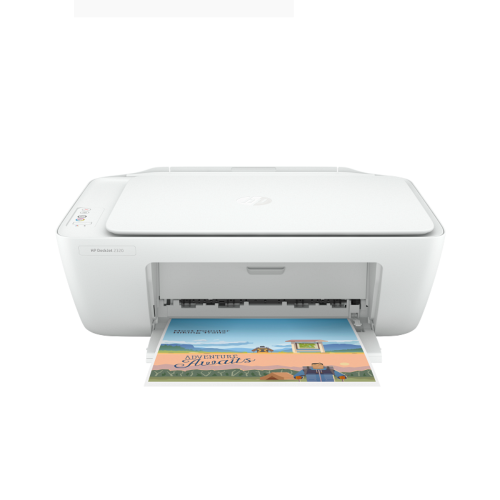
HP DeskJet 2320 All-in-One Printer -7WNA2B

HP DeskJet 2320 All-in-One Printer -7WNA2B
Stock Status: Available In Stock
Condition: New
SKU : 2515M44
Key Features
HP DeskJet 2320 All‑in‑One Printer – 7WNA2B – Key Features
-
Print, scan, and copy functions in one device
-
Compact and lightweight design for small spaces
-
Easy setup with HP Smart app support
-
USB 2.0 connectivity for reliable performance
-
Affordable ink cartridges for cost‑effective printing
-
Energy‑efficient design
Warranty (12 months)
The warranty tendered hereunder, on the electronic product(s) sold under this invoice will be provided exclusively by their respective Authorized Agents/Distributors and are limited to the period indicated from the date ofyour invoice, except otherwise mentioned as per the warranty conditions as carried along with the products(s)
Warranty Guide
Description
HP DeskJet 2320 All‑in‑One Printer – 7WNA2B – Overview
The HP DeskJet 2320 All‑in‑One Printer – 7WNA2B is a compact and affordable solution for everyday printing, scanning, and copying needs. Designed for home users, students, and small offices, it offers reliable performance with easy setup and straightforward functionality. Its lightweight design and user‑friendly interface make it a practical choice for those seeking a budget‑friendly all‑in‑one printer.
HP DeskJet 2320 All‑in‑One Printer – 7WNA2B – Specifications
| Component | Details |
|---|---|
| Model | HP DeskJet 2320 (7WNA2B) |
| Functions | Print, Scan, Copy |
| Print Technology | HP Thermal Inkjet |
| Print Resolution | Up to 4800 × 1200 optimized dpi |
| Print Speed | Up to 7.5 ppm (black), 5.5 ppm (color) |
| Scanner Type | Flatbed |
| Scanner Resolution | Up to 1200 dpi |
| Connectivity | USB 2.0 |
| Supported OS | Windows, macOS |
| Dimensions | 42.5 × 30.4 × 14.9 cm |
| Weight | ~3.4 kg |
| Color | White |
HP DeskJet 2320 All‑in‑One Printer – 7WNA2B – Price in Kenya
| Product Description | Price Range (KES) |
|---|---|
| HP DeskJet 2320 All‑in‑One Printer – 7WNA2B | KSh 6,999 – 8,499 |
HP DeskJet 2320 All‑in‑One Printer – 7WNA2B – Design and Build
-
Compact and lightweight design suitable for small desks
-
Clean white finish for a modern look
-
Flatbed scanner for easy document and photo scanning
-
Simple control panel for quick operation
HP DeskJet 2320 All‑in‑One Printer – 7WNA2B – Performance Benefits
-
All‑in‑one functionality: Print, scan, and copy in one device
-
Affordable printing: Low‑cost cartridges for budget‑friendly use
-
Easy setup: Quick installation with HP Smart app support
-
Reliable connectivity: USB 2.0 ensures stable performance
HP DeskJet 2320 All‑in‑One Printer – 7WNA2B – Ideal Use Cases
-
Students – printing assignments and study materials
-
Home users – everyday printing, scanning, and copying
-
Small offices – cost‑effective document handling
-
Families – printing school projects, photos, and forms
HP DeskJet 2320 All‑in‑One Printer – 7WNA2B – Pros and Cons
| Pros | Cons |
|---|---|
| Affordable price | No wireless connectivity |
| Compact and lightweight | Slower print speeds compared to higher models |
| All‑in‑one functionality | Basic features only |
| Easy setup | Not ideal for heavy printing workloads |
HP DeskJet 2320 All‑in‑One Printer – 7WNA2B – FAQs
1. Does it support wireless printing? No, it only supports USB 2.0 connectivity.
2. Can it print in color? Yes, it supports both black and color printing.
3. Is it suitable for photo printing? Yes, it can print photos with up to 4800 × 1200 optimized dpi.
4. Does it come with ink cartridges? Yes, starter cartridges are included in the box.
5. Is it good for heavy office use? It’s best suited for light to moderate home or student use.
Top Sellers


Available In Stock


Available In Stock


Convertible & Touch Screen Laptops


HP Envy x360 Convertible 14-es0033dx, Intel Core i7 1355U, 16GB DDR4 3200 (onboard), 1TB PCIe NVMe M.2 SSD, Windows 11 Home, 14" FHD Touch Screen, No ODD - 7H9Y1UA
Available In Stock


Recommended for you


Available In Stock
